How to set up a Mobile Hotspot on Android?

 How to set up a Mobile Hotspot on Android?


If you are from Pakistan, load shedding is a normal thing. Since most of us are working from home, sometimes it creates so much fuss especially when the internet router is not on UPS. In such circumstances, there is no need to create an issue as you have the internet in your pocket. Many would e thinking how. Well, you can turn your android device into a mobile hotspot and share your connection with other devices including computers and laptops. This blog will show you ways of setting up a mobile hotspot on Android device. Here’s how to do it.

How to set up a mobile hotspot on Android

The hotspot button is usually placed in the quick settings option of your mobile. That is one of the easiest ways to turn on and off your mobile hotspot, but you need to configure things first.

Here’s how you configure a hotspot connection on Android:

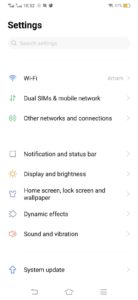
  1. Open the Settings app.
  2. Click the Network & Internet option.

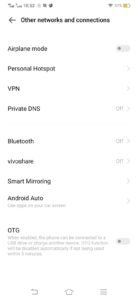
  1. Now select Hotspot & tethering.

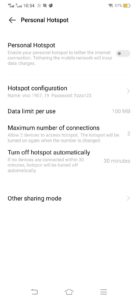
  1. Tap on the Wi-Fi hotspot.

  1. This page gives you the option of turning the hotspot feature on and off. From here, one can also change the network name, security type, password, and more.

You have to carry on these steps for just one time and after that, you can easily turn on and off the hotspot feature. Also remember, that not all smartphone manufacturers will place hotspot icons in quick widgets so the steps might differ a little bit.

Set up mobile hotspot via USB

One can also set up a mobile hotspot through the phone’s USB connection. However, this step does not work with every mobile phone. If your device is supportive, you can do it by following the steps below:

  1. Connect your Android phone with a computer through a USB cable.
  2. Wait for some time till the connection sets up
  3. Open the Settings app.
  4. Tap on the Network & Internet option.
  5. Select Hotspot & tethering.
  6. Toggle the USB tethering option.

One can also activate Bluetooth tethering through the same process, however, the experience is quite slow.

Set up a mobile hotspot with a third-party app

The new smartphones come with built-in hotspot capabilities however in the past people were not facilitated with this feature. So for people who are using old smartphones have no hotspot option need the help of a third-party app in order to get privileged. Two of the apps which can be used for this purpose are PdaNet+ and Portable Wi-Fi hotspot.

There are many other apps that offer the same functionality however one needs to keep security in mind which should be the actual priority.

Also Read: How to Turn On Wifi Hotspot on Jazz Digit 4G?


Comments

Popular posts from this blog

How to Turn WhatsApp Disappearing Messages on or off?

      The popular messaging platform WhatsApp gets updated every now and then. However, one latest update is an interesting one which is called the disappearing messages. The users can now send messages that disappear on WhatsApp by toggling on the disappearing message feature. There are different durations or timelines that you can set for the disappearing message feature. These include 24 hours, 7 days, and 90 days time periods. Once the feature is toggled on, the new messages sent in the chat will vanish after the duration the user has set. Furthermore, it is pertinent to mention here that the messages sent or received prior to the disappearing messages feature came out won’t be affected. What if a User Doesn’t Open the Chat in the Set Duration of disappearing messages? In a cast when any user doesn’t open WhatsApp in the set duration of disappearing messages, then those message will disappear. Though, still, the preview of that message would still be dis...

CARE International in Pakistan and Mastercard launch ‘Ignite’ program to support millions of entrepreneurs

  In support of the Pakistan Government’s National Financial Inclusion Strategy (NFIS), CARE International in Pakistan (CIP) and Mastercard today launched the ‘ Ignite’ small business program during a ceremony presided by Dr. Sania Nishtar, Special Assistant to the Prime Minister, in Islamabad. The program is part of a global collaboration between CARE and the Mastercard Center for Inclusive Growth. The program will be rolled out with several local partners including U-Bank – its financial service provider, White Rice – a behavioral design firm and Mera Maan – a social enterprise focused on capacity building and enterprise development. Over three years, ‘Ignite’ will: Impact 397,000 entrepreneurs , their employees, and family members with capacity and skills Accelerate the growth of 45,000 entrepreneurs by unlocking access to Mentor 3,000 entrepreneurs concentrating on digital skills and Reach an additional 2 million entrepreneurs through the outreach campaign by creating ...