
The popular messaging platform WhatsApp gets updated every now and then. However, one latest update is an interesting one which is called the disappearing messages. The users can now send messages that disappear on WhatsApp by toggling on the disappearing message feature. There are different durations or timelines that you can set for the disappearing message feature. These include 24 hours, 7 days, and 90 days time periods. Once the feature is toggled on, the new messages sent in the chat will vanish after the duration the user has set. Furthermore, it is pertinent to mention here that the messages sent or received prior to the disappearing messages feature came out won’t be affected.
What if a User Doesn’t Open the Chat in the Set Duration of disappearing messages?
In a cast when any user doesn’t open WhatsApp in the set duration of disappearing messages, then those message will disappear. Though, still, the preview of that message would still be displayed in notifications until WhatsApp is launched.
What happens to the media in disappearing messages on WhatsApp?
By default, if you have already enabled the auto download feature from the setting then the media you will receive in WhatsApp will be automatically downloaded to your gallery. If disappearing message feature is toggled on, then media sent in the chat will vansih but will be saved on the smartphone. But if you dont want that, you can turn auto-download off from the settings in WhatsApp.
What happens when disappearing messages are turned off?
As afore mentioned when Disappearing message features are turned on, the messages sent during the designated time period will get vanished. However, when you turn off Disappearing Messages, then all the text and media you share will continue to be dislayed like normal messages. However, any message that has been forwarded will still show up.
How to Turn WhatsApp Disappearing Messages on?
The user has the option to either enable disappearing message feature in an individual chat or a group chat. Once it is enabled, the new messages in the chat will vanish after the duration you have selected.
- First, open the WhatsApp indvidual chat or group chat.

2. Now click on the contact name as illustrated in the given image.
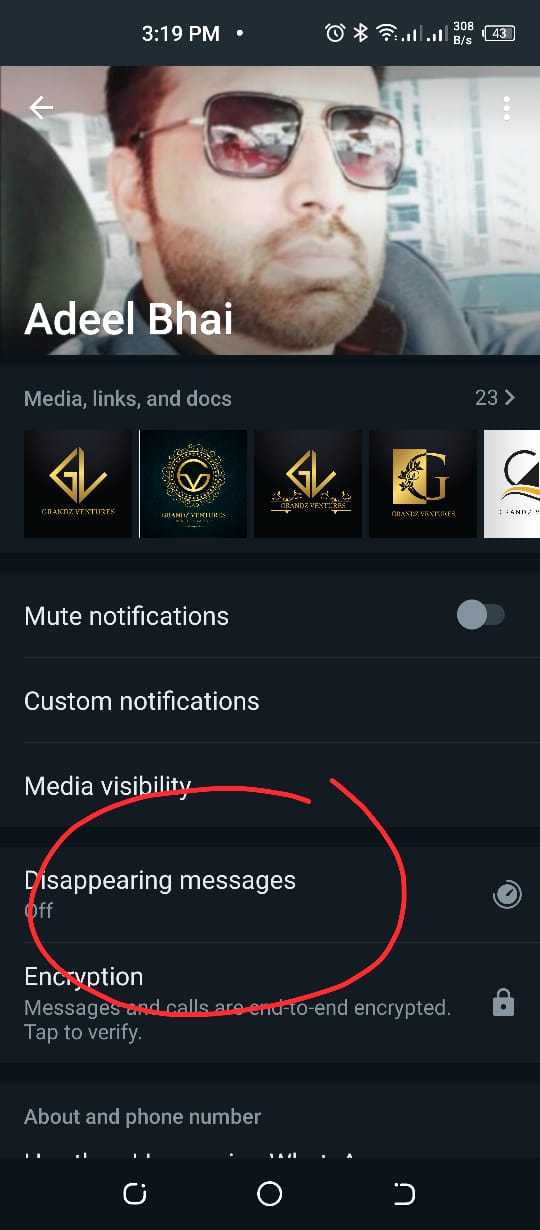 3.
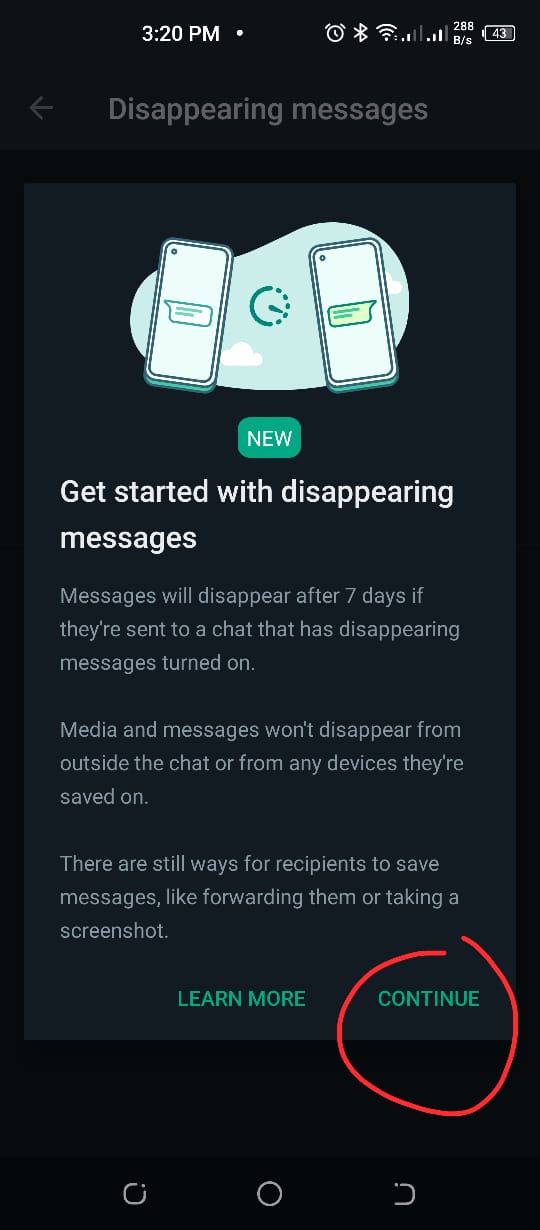
Afterward, click on disappearing messages feature as shown in the
image. Now, you will be prompted with disappearing message info guide.
Tap on continue.
3.
Afterward, click on disappearing messages feature as shown in the
image. Now, you will be prompted with disappearing message info guide.
Tap on continue.
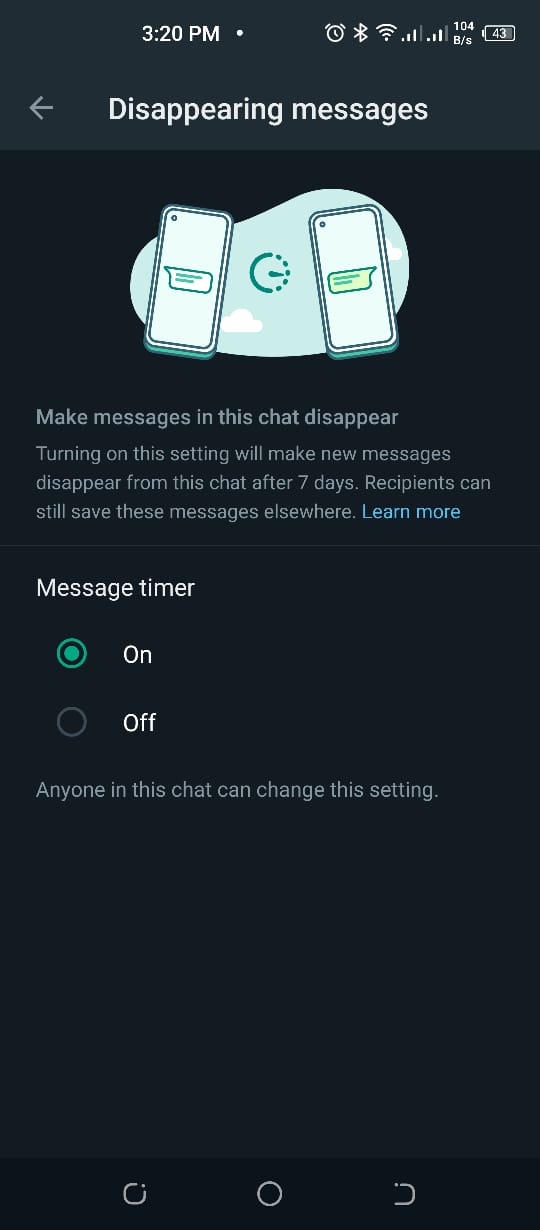
4. Now from the next window, toggle ‘yes’ as shown in the image.
How to disable disappearing message feature?
Simultanoeusly, the user has the option to disable disappearing message feature at any instant. Once disabled, new messages sent in the conversation will no longer disappear.
- Similarly, open the WhatsApp chat.
- Now, click on the contact’s name as you did above.
- Now click on the disappearing message feature and tap on continue.
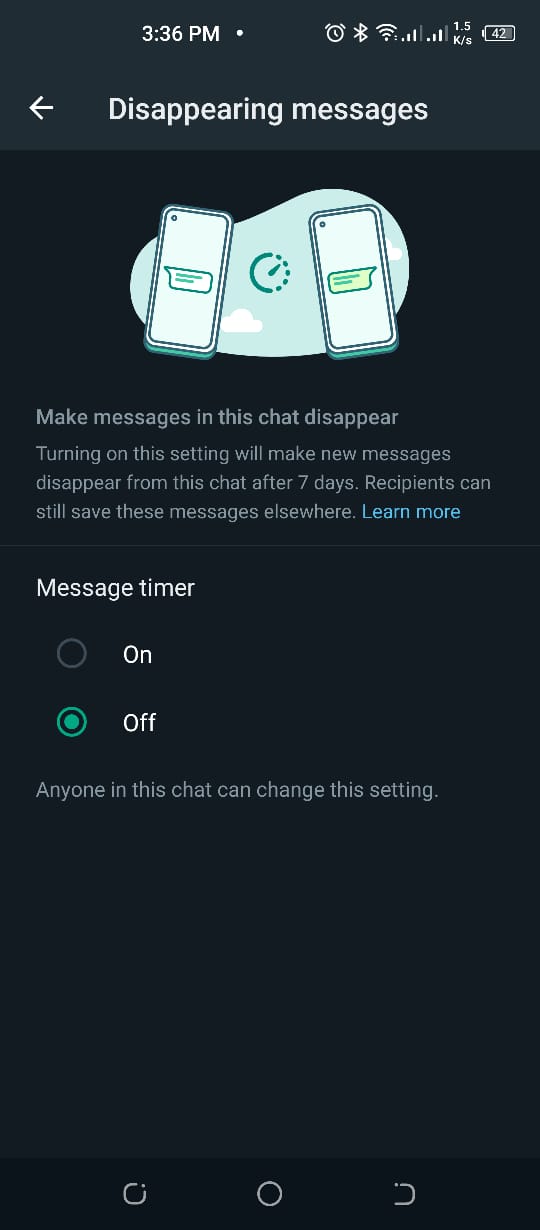
- Afterward, click on ‘off’ as illustrated in the image.
Some Points to be Noted:
- When you reply to a particular text message, the initial message gets quoted in the reply. Similarly, if you reply to a disappearing message, the quoted text will still remain irrespective of the duration.
- If a text is forwarded to a chat with disappearing messages disabled, then the message won’t disappear in the forwarded conversation.
- If any user creates a chat backup before the set duration of disappearing message, then it will be included in the backup. However, these disappearing messages will be vanished when a user restores from a backup.
- One another thing you must make sure of is that only use disappearing messages with trusted individuals. For instance, it’s possible for someone to:
- Take a screenshot of any disappearing message before it disappears.
- Copy and save the content from the disappearing message before it gets removed.
- A person can also take an image of a disappearing message with a camera before it disappears.
Conclusion:
The aforementioned guide is made after hours of research. If you like our article or have any queries regarding it, do mention them in the comment section!
Comments
Post a Comment